Showing posts with label publishing site. Show all posts

Wednesday, December 1, 2010

How to check-out the publishing site in SharePoint 2010

As you known, SharePoint Site has a lot of template and each of them has a different UI and powerful. I would like to introduce about Publishing Site Template and web part pages belong to the site.

Before you work on Publishing Site, you have to Check out first, and while you are checking this site out, another user can not work on that site any more until you perform the action Discard Check-Out or Check-In. Each of user has a different configuration or properties bag of the site.

In SharePoint 2010, we work with the functionalities of the site (web part, page,...) on Ribbon Menu. To perform Check-out, just click Edit button on Ribbon Menu and click Check-Out:


After Check-Out, you can insert Form, List, WP,...etc. However, it just effects to this site, site collection, sub-site, page,... aren't effected. In this example, I created a sub site with Business Intelligence Center template.


This template is very special because you will not see the Ribbon Menu on top. So, if you try to edit this site and insert s.t in this site, you will get the error like this:


The problem is how to check out this site while the Ribbon Menu is hidden!
Okay, on each of site, it has a template to format the layout, that means the master page for it is different from normal or default. The Ribbon Menu is also customized. In Business Intelligence Center, the Ribbon is hidden,  let activate the Ribbon to work much more things on it.

Go to Site Action -> Show Ribbon:
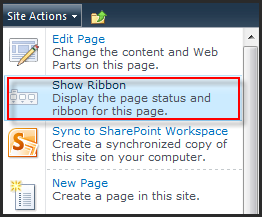
It's really easier when the Ribbon Menu is on top. Just click on Edit button to SharePoint switch the web page to be editable and Edit Ribbon also. Then, click Edit page:

The site editable does not mean you can add anything into this site, you must check out this site first and then doing s.t. When you click on Add Web Part, SharePoint will ask you to want to Check-Out this site, then allow you insert WP, List,...etc.


Okay, you can do your task from now.

Saturday, July 31, 2010

Can not save properties WP in publishing site...

There's the interesting thing when you are a developer based on SharePoint that why do not save the properties of Web Part if it is publishing site template.

Of course, when you save the properties at the runtime, you must set SaveProperties = true to apply the any changes.

But in publishing site, before doing any changes on WP, you must do check out and after finish changing to do check in. At the same time, only one user can be checked-out/checked-in to avoid the conflict.

.....

Một điều thú vị mà ai khi lập trình SharePoint cũng sẻ hỏi là, tại sao không lưu được các thuộc tính của webpart khi sử dụng template Publishing Site.

Dĩ nhiên, khi thực hiện thao tác lưu thuộc tính của webpart cho dù runtime hay không thì việc s73 dụng thuộc tính SaveProperties = true cũng chẳng ảnh hưởng nhiều, mục đích chỉ để Apply những thì đã thay đổi.

Trong publishing site, muôn lưu lại các thuộc tính của WP thì truoc tiên phải Check Out site đó ra, rồi thao tác trên WP, sau khi thao tác xong, nhớ check in lên; Tại 1 thời điểm chỉ có 1 user có thể check out và check in để tránh conflict.