I am working on list definition with the type id is 10001, my list is based on Calendar list.
But how can i indicate my list def is Events List or not?
Thanks for you helping!
Wednesday, February 23, 2011


Friday, February 18, 2011
Support discussion board list definition in VS2010 template
Visual Studio 2010 had supported List Definition template to create the project automatically with fully the schema and define the structure of list. Unfonately, it has not supported for Dicussion Board list.
But you can download another template to upgrade your existed template and can use dicussion board list.
Download here
To use this package, please following this instruction:
But you can download another template to upgrade your existed template and can use dicussion board list.
Download here
To use this package, please following this instruction:
- Extract this pakage then copy all folders & files into: C:\Program Files (x86)\Microsoft Visual Studio 10.0\Common7\IDE\ProjectTemplatesCache\CSharp\SharePoint\SharePoint14\1033\SharePoint14ListDefinition.zip
- Copy this compressed file into: C:\Program Files (x86)\Microsoft Visual Studio 10.0\Common7\IDE\ProjectTemplates\CSharp\SharePoint\SharePoint14\1033
- Please overwrite all files and folders as if request.
Good luck!
Monday, February 14, 2011
"Access denied. Exception from HRESULT: 0x80070005 (E_ACCESSDENIED))"
Contribute account can access and some actions on the page. I created a new page with inheritance from the default.master of SharePoint 2010.
I tested on SharePoint 2007 and as a result it works smoothly. But in SharePoint 2010, I got an error:
"Access denied. Exception from HRESULT: 0x80070005 (E_ACCESSDENIED))"
The trace log:

It took me some hours to find out the problem, event thought I run the debugging line by line but it thows the exception before reach the CreateChildControl method. I guest it happens from ASPX or MasterPage.
Here is the problem:

Some resources of this MasterPage can not be accessed by Contributor account, so just remove them out. Hope this help you fix your issue.
I tested on SharePoint 2007 and as a result it works smoothly. But in SharePoint 2010, I got an error:
"Access denied. Exception from HRESULT: 0x80070005 (E_ACCESSDENIED))"
The trace log:
It took me some hours to find out the problem, event thought I run the debugging line by line but it thows the exception before reach the CreateChildControl method. I guest it happens from ASPX or MasterPage.
Here is the problem:
Some resources of this MasterPage can not be accessed by Contributor account, so just remove them out. Hope this help you fix your issue.
Sunday, February 13, 2011
"Access denied" when using contributor account to access to content-type
When I was using the contributor account to check the content-type folder is "message" or "Dicussion", I got an error: "Access denied!"
My code:
if (ctype.ResourceFolder.Name == "Message")
{
//do something
}
But nothing happened with owner account.
Yes, because contributor account can not access to ResourceFolder properties of content-type. ResourceFolder was inherited from SPFolder and execute the method FolderEnsure. You know to give the access to folder ensure the account must be set the properties currentWeb.AllowUnsafeUpdates = true; and the default for member account does not have permission to run that update.
You can change the code to look like this:
if (ctype.Id == SPBuiltInContentTypeId.Message)
{
//do something
}
The result is nearly the same.
My code:
if (ctype.ResourceFolder.Name == "Message")
{
//do something
}
But nothing happened with owner account.
Yes, because contributor account can not access to ResourceFolder properties of content-type. ResourceFolder was inherited from SPFolder and execute the method FolderEnsure. You know to give the access to folder ensure the account must be set the properties currentWeb.AllowUnsafeUpdates = true; and the default for member account does not have permission to run that update.
You can change the code to look like this:
if (ctype.Id == SPBuiltInContentTypeId.Message)
{
//do something
}
The result is nearly the same.
Monday, January 24, 2011
How to get all items of Discussion Board list using Web Service.
Hello everybody,
I am working on Discussion Board list using Web Service. I am so supprised that the DB list is not the same as another list in SharePoint. The first sign of my mind is Calendar List Item, SharePoint stores the StartDate & EndDate with a different ways. To get the correctly data, we must understand clearly about architecture of Calendar list.
For now, the problem about Calendar was solved and faced to another problem. Discussion Board list has 2 item types: Dicussion (threads) and Message (replies). When you get all items by normaly, you only get the discussion items, take a look at code:
XmlDocument document = new XmlDocument();
XmlNode query = document.CreateNode(XmlNodeType.Element, "Query", "");
XmlNode viewFields = document.CreateNode(XmlNodeType.Element, "ViewFields", "");
XmlNode queryOptions = document.CreateNode(XmlNodeType.Element, "QueryOptions", "");
queryOptions.InnerXml = "<ViewAttributes Scope='RecursiveAll'/>";
Lists lists = new Lists(URL_SERVER);
lists.Credentials = CredentialCache.DefaultCredentials;
XmlNode node4 = lists.GetListItems(sourceList, "", query, viewFields, "", queryOptions);
Okey, even thought Scope attribute is set to "RecursiveAll", and SharePoint 2007 works fine. All items including reply items are list. But it does not work in SharePoint 2010, so it is not actually difficult to fix for SharePoint 2010. Just update your query CALM like the code below:
query.InnerXml = @"<Query>
<Where>
<Geq>
<FieldRef Name=""DiscussionLastUpdated"" />
<Value Type=""DateTime"">1900-01-01T00:00:00Z</Value>
</Geq>
</Where>
</Query>";
Yes, that's it.
I am working on Discussion Board list using Web Service. I am so supprised that the DB list is not the same as another list in SharePoint. The first sign of my mind is Calendar List Item, SharePoint stores the StartDate & EndDate with a different ways. To get the correctly data, we must understand clearly about architecture of Calendar list.
For now, the problem about Calendar was solved and faced to another problem. Discussion Board list has 2 item types: Dicussion (threads) and Message (replies). When you get all items by normaly, you only get the discussion items, take a look at code:
XmlDocument document = new XmlDocument();
XmlNode query = document.CreateNode(XmlNodeType.Element, "Query", "");
XmlNode viewFields = document.CreateNode(XmlNodeType.Element, "ViewFields", "");
XmlNode queryOptions = document.CreateNode(XmlNodeType.Element, "QueryOptions", "");
queryOptions.InnerXml = "<ViewAttributes Scope='RecursiveAll'/>";
Lists lists = new Lists(URL_SERVER);
lists.Credentials = CredentialCache.DefaultCredentials;
XmlNode node4 = lists.GetListItems(sourceList, "", query, viewFields, "", queryOptions);
Okey, even thought Scope attribute is set to "RecursiveAll", and SharePoint 2007 works fine. All items including reply items are list. But it does not work in SharePoint 2010, so it is not actually difficult to fix for SharePoint 2010. Just update your query CALM like the code below:
query.InnerXml = @"<Query>
<Where>
<Geq>
<FieldRef Name=""DiscussionLastUpdated"" />
<Value Type=""DateTime"">1900-01-01T00:00:00Z</Value>
</Geq>
</Where>
</Query>";
Yes, that's it.
Sunday, January 23, 2011
Show friendly error in SharePoint
Sometime, i dont know why my webpart (or site/page) happens error, event thought i turned off the CustomError tag in Web.Config
<CustomError mode="Off"/>
The default vallue of Mode is "ON", that means, SharePoint will show the error page liek this:
 We've never known what about this error and also in the code there are any functions/methods give this issue. So, to let SharePoint show friendly the error and the stack trace of this error, we must change some values/attribute of tag in web.config.
1) Set Mode of <customerror> is Off
<CustomError mode="Off"/>
2) Find the tag <combilation> and change the value of debug is True
<compilation batch="false" debug="true">
3) In <SharePoint> tag, change the attributes of <SafeMode> to be:
<SafeMode MaxControls="200" CallStack="true" DirectFileDependencies="10" TotalFileDependencies="50" AllowPageLevelTrace="true">
Remember that doing reset IIS before press F5.
Now you can see your error as details and it's very easy to fix.
<CustomError mode="Off"/>
The default vallue of Mode is "ON", that means, SharePoint will show the error page liek this:
1) Set Mode of <customerror> is Off
<CustomError mode="Off"/>
2) Find the tag <combilation> and change the value of debug is True
<compilation batch="false" debug="true">
3) In <SharePoint> tag, change the attributes of <SafeMode> to be:
<SafeMode MaxControls="200" CallStack="true" DirectFileDependencies="10" TotalFileDependencies="50" AllowPageLevelTrace="true">
Remember that doing reset IIS before press F5.
Now you can see your error as details and it's very easy to fix.
Sunday, December 26, 2010
Q/A: Ajax Extensions does not work when I add webpart
Q/A:
“My server was already installed .NET Framework 3.5, that mean Ajax Extensions component was also installed. And then I installed Bamboo Calendar Plus 4.0 for MOSS/WSS 2007 on Windows Server 2003 x86/x64 SP2. Next step, I installed Bamboo Ajax Configuration and Bamboo Shared Assemblies. After all I addressed to Central Administration -> Application Management -> Manage Web Application Features and activate Bamboo Ajax for web application of port 80. But I’ve got an error after browse my site, the error looks like this:

Or when I add Cal+ into web part zone, it shows error

Please help me figure out this problem.
Answer:
That’s for sure the error happens. Because you have already Ajax Extensions 3.5 after installed .NET Framework 3.5, and you did not install Ajax Extension 1.0.61025.0, thus it shows error.
To solve this problem, please do as following step:
- Install Ajax Extension 1.0.61025.0 in Bamboo Installer Package
OR
- Add these lines in web.config of port 80
<dependentAssembly>
<assemblyIdentity name="System.Web.Extensions" publicKeyToken="31bf3856ad364e35" culture="neutral" />
<bindingRedirect oldVersion="1.0.0.0-1.1.0.0" newVersion="3.5.0.0" />
</dependentAssembly>
Do an IISRESET.
<assemblyIdentity name="System.Web.Extensions" publicKeyToken="31bf3856ad364e35" culture="neutral" />
<bindingRedirect oldVersion="1.0.0.0-1.1.0.0" newVersion="3.5.0.0" />
</dependentAssembly>
Do an IISRESET.
Monday, December 13, 2010
SharePoint Saturday Conference at Ho Chi Minh City, Jan/22
Sharepoint Saturday Conference tại TPHCM ngày 22/01/2011
SharePoint Staurday sẽ được khai mạc tại TPHCM vào ngày 22/01/2011
Mục đích là để kết nối cộng đồng SharePoint việt nam.
SharePoint Saturday là một hình thức giáo dục, nâng cao kiến thức với nhiều chuyên mục từ những chuyên gia về SharePoint, cung cấp khá nhiều thông tin định hướng SharePoint. Hội thảo hoàn toàn miễn phí, vào cửa tự do và đây là cơ hội tốt để chúng ta tự nâng cao kiến thức của mình.
Tất cả mọi người đã quen với việc sử dụng SharePoint như Office Server hay Office 14 đều có thể tham gia để chia sẽ kinh nghiêm với những chuyên gia hàng đầu về công nghệ sharepoint.
-------------------------------------------------------------------------------------------
The inaugural SharePoint Saturday Vietnam will be held in Ho Chi Minh on January the 22nd.
Connect with the Vietnamese Sharepoint community.
SharePoint Saturday is an educational, informative & lively day filled with sessions from respected SharePoint professionals, covering a wide variety of SharePoint-orientated topics. It is FREE, open to the public and is your local chance to immerse yourself in SharePoint!
Join SharePoint architects, developers, and other professionals that work with Microsoft Office SharePoint Server 2007 and SharePoint 2010 in order to share you experience about these technologies, or get recommandations and knowledge of SP experts.
-------------------------------------------------------------------------------------------
Đăng ký tham gia tại đây.

http://sharepointvietnam.net/forum/showthread.php/1077-Sharepoint-Saturday-Conference-t%E1%BA%A1i-TPHCM-ng%C3%A0y-22-01-2011?p=2056#post2056
Wednesday, December 1, 2010
How to check-out the publishing site in SharePoint 2010
As you known, SharePoint Site has a lot of template and each of them has a different UI and powerful. I would like to introduce about Publishing Site Template and web part pages belong to the site.
Before you work on Publishing Site, you have to Check out first, and while you are checking this site out, another user can not work on that site any more until you perform the action Discard Check-Out or Check-In. Each of user has a different configuration or properties bag of the site.
In SharePoint 2010, we work with the functionalities of the site (web part, page,...) on Ribbon Menu. To perform Check-out, just click Edit button on Ribbon Menu and click Check-Out:

After Check-Out, you can insert Form, List, WP,...etc. However, it just effects to this site, site collection, sub-site, page,... aren't effected. In this example, I created a sub site with Business Intelligence Center template.

This template is very special because you will not see the Ribbon Menu on top. So, if you try to edit this site and insert s.t in this site, you will get the error like this:

The problem is how to check out this site while the Ribbon Menu is hidden!
Okay, on each of site, it has a template to format the layout, that means the master page for it is different from normal or default. The Ribbon Menu is also customized. In Business Intelligence Center, the Ribbon is hidden, let activate the Ribbon to work much more things on it.
Go to Site Action -> Show Ribbon:
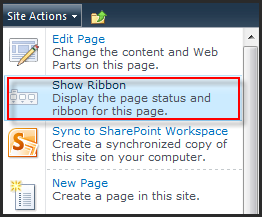 It's really easier when the Ribbon Menu is on top. Just click on Edit button to SharePoint switch the web page to be editable and Edit Ribbon also. Then, click Edit page:
 The site editable does not mean you can add anything into this site, you must check out this site first and then doing s.t. When you click on Add Web Part, SharePoint will ask you to want to Check-Out this site, then allow you insert WP, List,...etc.

Okay, you can do your task from now.
Before you work on Publishing Site, you have to Check out first, and while you are checking this site out, another user can not work on that site any more until you perform the action Discard Check-Out or Check-In. Each of user has a different configuration or properties bag of the site.
In SharePoint 2010, we work with the functionalities of the site (web part, page,...) on Ribbon Menu. To perform Check-out, just click Edit button on Ribbon Menu and click Check-Out:
After Check-Out, you can insert Form, List, WP,...etc. However, it just effects to this site, site collection, sub-site, page,... aren't effected. In this example, I created a sub site with Business Intelligence Center template.
This template is very special because you will not see the Ribbon Menu on top. So, if you try to edit this site and insert s.t in this site, you will get the error like this:
The problem is how to check out this site while the Ribbon Menu is hidden!
Okay, on each of site, it has a template to format the layout, that means the master page for it is different from normal or default. The Ribbon Menu is also customized. In Business Intelligence Center, the Ribbon is hidden, let activate the Ribbon to work much more things on it.
Go to Site Action -> Show Ribbon:
Tuesday, November 30, 2010
How to Disable Large List Resource Throttling in SharePoint 2010
Users of a site may require access to all the items in a list, even if that list’s views contain more items than have been allotted for the web application in Central Administration. The Resource Throttling options available allow administrators to set a block of time each day during which large list resource throttling does not occur.
During this time, any user will be able to access the list and any views on that list without the list being throttled by the server. It is possible that during this time the server may take a performance hit while rendering huge amounts of data or if multiple users are accessing a large list simultaneously. Therefore, it is advisable to set the time window during off-peak hours, or when traffic to the server is at a minimum.
Setting the time block during which list throttling will not occur is done in Central Administration in the Resource Throttling options for each web application. The steps below outline the process for setting the daily time window:

It is important to keep in mind the performance impact this could have on the servers, so set the time window accordingly.
Another option available for some users (generally developers) who have certain privileges is to use the object model override to access the items in the list. This can be accomplished using Windows PowerShell or Visual Studio and allows users with proper rights access to a larger subset of items at a time, even if resource throttling is enabled. However, even with the object model override, users will still be restricted to the limit set for administrators and auditors.
You should note the following when using the list throttling capabilities of SharePoint Server 2010:
The local server Administrator account is not affected by the list throttling settings. Therefore, the server Administrator has full, unrestricted access to the list.
The Daily Time Window is not necessarily a hard cut-off time for access to the list. For example, if a user is accessing a large view of the list that is taking a long time to render, the list will finish loading even if the end of the Daily Time Window has been reached. Then, the list will be throttled once again.
Source: FROM Microsoft E-Learning
During this time, any user will be able to access the list and any views on that list without the list being throttled by the server. It is possible that during this time the server may take a performance hit while rendering huge amounts of data or if multiple users are accessing a large list simultaneously. Therefore, it is advisable to set the time window during off-peak hours, or when traffic to the server is at a minimum.
Setting the time block during which list throttling will not occur is done in Central Administration in the Resource Throttling options for each web application. The steps below outline the process for setting the daily time window:
- From the Central Administration homepage, click Application Management.
- Click Manage Web Applications.
- Select a Web application from the list.
- In the Ribbon, click the dropdown under General Settings.
- Click Resource Throttling.
- In the Daily Time Window for Large Queries section, check the box to enable the time window.
- Choose the hour that the time window should start, and select the number of hours it will remain open.
It is important to keep in mind the performance impact this could have on the servers, so set the time window accordingly.
Another option available for some users (generally developers) who have certain privileges is to use the object model override to access the items in the list. This can be accomplished using Windows PowerShell or Visual Studio and allows users with proper rights access to a larger subset of items at a time, even if resource throttling is enabled. However, even with the object model override, users will still be restricted to the limit set for administrators and auditors.
You should note the following when using the list throttling capabilities of SharePoint Server 2010:
The local server Administrator account is not affected by the list throttling settings. Therefore, the server Administrator has full, unrestricted access to the list.
The Daily Time Window is not necessarily a hard cut-off time for access to the list. For example, if a user is accessing a large view of the list that is taking a long time to render, the list will finish loading even if the end of the Daily Time Window has been reached. Then, the list will be throttled once again.
Source: FROM Microsoft E-Learning
Subscribe to:
Posts (Atom)