Tuesday, August 25, 2015

SharePoint 2016 IT Preview is available

Microsoft has announced the downloadable package of SharePoint 2016 and waiting for getting the feedback from users.

This released is proved that SharePoint is still alive, health and continue grow up with a lot of new features. Some of features is obsoleted and replaced by new better features.


The download package can be downloaded here

The new features will be supported in this releases:

  • Post to Yammer
  • New control for OneDrive Business
  • Site page pinning
  • Site folder view
  • Recycle Bin for OneDrive and Team Sites
  • Images and videos preview
  • Document library with the shortcut keys
  • Web Application Open Platform Interface Protocol (WOPI)


and many updates for old features.


Tuesday, April 14, 2015

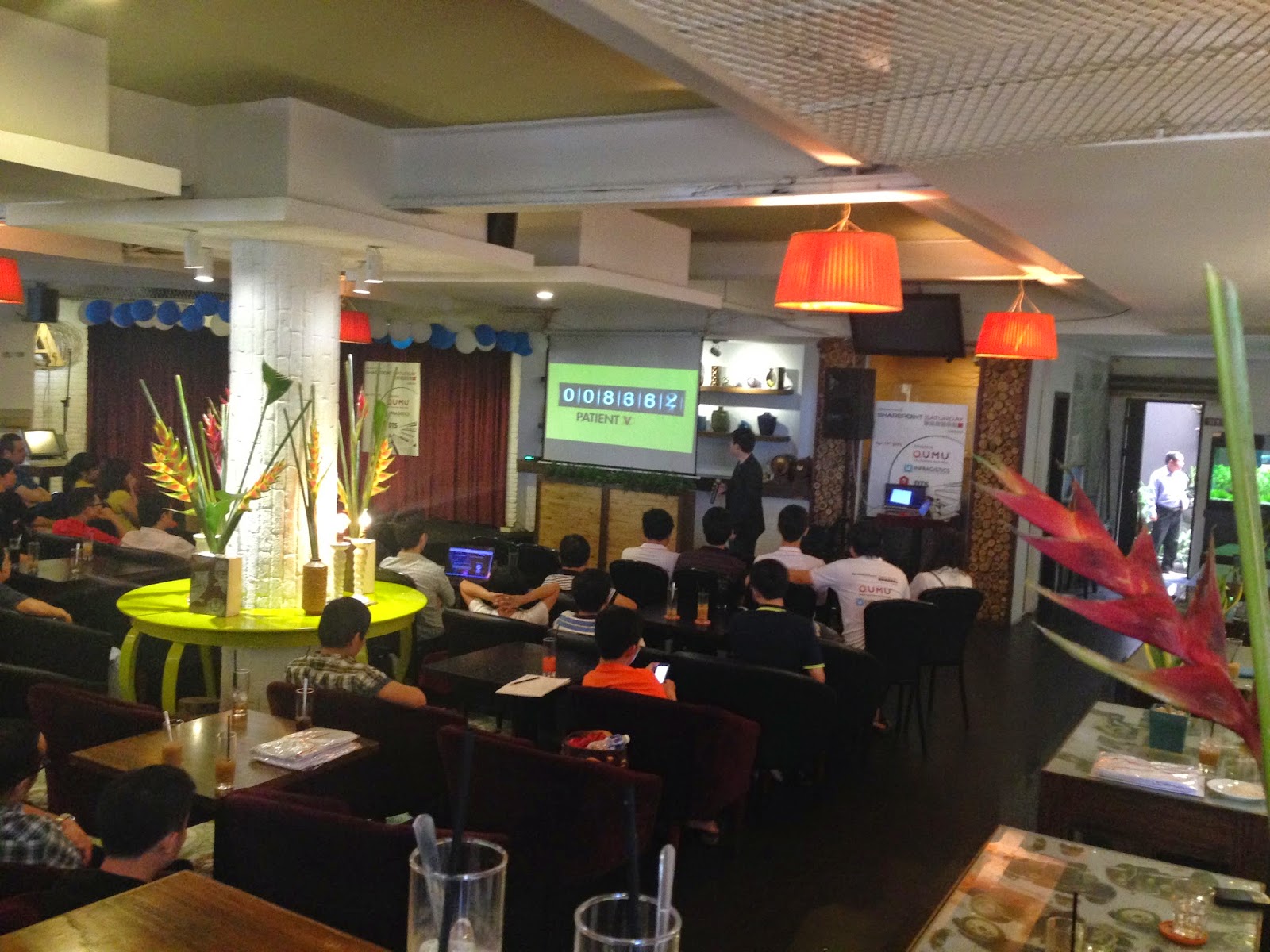
SharePoint Saturday Event 8th - The best ever event.

Thank you all of you to attend the #SharePoint #Saturday event at An Nam Cafe, Ho Chi Minh City. The success today is indispensable for your coming, we always sincere respect the precious time that you save for us, for this event. We give a special thank to the sponsors, who helped us organize the seminar being successful. In privately, I would like to say thank you to NIFIT, was accompanied with SPS Viet Nam during 2 years, and QUMU, a Singapore company shared and present for the first time.

With this, SPS Viet Nam opened the wide knowledge in each topic:

  • SharePoint /w internet of things: the new thing in SPS event and in HCMC, I thought! However, if you have a confident idea enough to design an interesting component (I don't know how to define the thing) and run with SharePoint, it may be the most exciting device in some day, and SharePoint will be a transporter! It was introduced by Hoang An Phan from Fablab Sai Gon
  •  Perhaps, your mind just keep the image of Skype, Lync or whatever software for conference with both sound and video. QUMU bring the ability other to communicate in the meeting. That is to use any devices for your connection. Especially, the tool can work on any devices and browser. Their solutions will help you leave the traditional video software's and reach out of the completely comfortable usage.
  • The next interesting in event is how to use SingalR to build a SharePoint real-time application and new UI with AngularJS. This topic opens a variety ideas for new SharePoint solutions or application. The gamification is also the new term in software application industrial, especially for SharePoint, can integrate to/with many tools, techs to have a social part such as Yammer tracking personal actions. In this event, Mr. Tiep introduced a demo about live chating/communicating based on SharePoint webpart.
  • The last session is a deep-dive of manage meta-data for search service. Mr. Binh, from Appvity, presented a way to manage and search the term, and gave many useful examples in real life, real time. This session help us understand more and more about how SharePoint can handle the term and apply to search service. So great!
We are so sorry about the missing T-Shirts and seats for audiences because we do only forecast about 80-100 attendees. However, the game is over! So crowed!


Finally, thank you all speakers in the 8th of SPS Viet Nam. Hopefully, in the next event, we will have more exciting topics for small and average company which are considered transfering from other to SharePoint. Please follow us to get started with SharePoint and improve your value in managing the company.

Wednesday, April 1, 2015

Explain the abbreviation in SharePoint

Regarding to request from my friends having the explanation of abbreviation in SharePoint. This may not totally enough but it might help you know clearly when you read the document.


  • WAD: work as design. You were surprised of strange thing when you do something on SharePoint list or page. You think different and the result must be like your thought. E.g: When you switch from Subject view of discussion list in SharePoint 2013 to Management view, you think that the page will redirect to flat or thread view. But the result was not shown the same as your though. It redirects to itself and you see the item was clicked to be a folder. It calls SharePoint WAD.
  • OOTB: out-of-the-box. This term lets you know what SharePoint support. E.g: In the discussion list of SharePoint 2013, it was integrated the Like and Rating for SP Office Server version. You needn't install any 3rd-party to support the rating and like functioning for this list. This function is called SharePoint OOTB. Almost SharePoint software company produce a product or customize or give a solution are having the idea to support the functioning that SP OOTB does not have.
  • CSOM: client side ojbect model. This abbreviation is related to the program is run on client side. E.g: You want to create a console or windows form to access to SharePoint site and SharePoint server is working as remoting. You can use C# or VB to develop the program and, of course, SharePoint always support the DLL for your reference to the code.
  • JSOM: javascript object model. This model works only in the SharePoint application page or web part, or whatever you need to run in the web page.The objects is built in the SharePoint's JS files in the layouts folder of 15/hive (14/hive). E.g: You build a web part and you need to access the list at the run-time, you could implement something like this:
          var web = SP.ClientContext.get_current().get_web();
  •  REST API: Representational State Transfer API. Think of it simple like coding by javascript, vb or c#. Actually you have to use javascript object to access the SharePoint items. A technical named RESTful will help you understand a deep knowledge base of this term. However, you can image that you can access to all SharePoint objects site by using an address and the method of client context. REST API just only support on SharePoint 2013 and SharePoint online (Office 365). For more information, click  on REST API reference and samples. For SharePoint 2010, you could get and install MashPoint REST by Bamboo Solutions. REST API helps you access the site anywhere, easy to learn, safe in work and fast on time.
         For more information of REST vs CSOM, visit AndrewConnel blog
  • Built-in: This term means you don't need to customize anymore. Just get and build. E.g: You need to build a custom column with a compatibility functioning in the backend, but it's so simple in the new/edit/display form because you only use the controls that SharePoint has been supported. That calls built-in controls.
  •  More...
Hey guys, please let me know more abbreviation!

Tuesday, March 31, 2015

SPS VietNam: April 11, 2015 - Don't miss! Last chance!

It's really hard to hold the event for SharePoint in Viet Nam. Having no more connection between company and SharePoint community/group. We, SPS and SPUG, always bring the knowledge to share with all IT support, IT manager, developers and others who are working in IT industry. SPS Viet Nam is a popular communication about SharePoint in Viet Nam and this organization always hanlde the SharePoint events. It's completely free!

Finally, the next event is coming soon on April 11, 2015.
Don't miss!
Last chance!


Regist here: 


Free!

Monday, March 30, 2015

List Definition was changed the schema for existing lists!

Until now, I did not know exactly the processing of deployment list definition and there is any changes on each of SharePoint version. I have scenario that I am facing the problem with migration and upgrading list definition. Just is:

I create a list definition based on custom list, because I need to declare all fields, views and the user interface rendering. It's actually basically and for testing purpose only.

The list has only one column named "Title" as default, because I do not know what the next column is to do, so I will upgrade the list def later. I called the list /w version 1.


I modified the list definition schema to add more fields:


Then, from Visual Studio (version 2012) context menu, I click to deploy directly to site. Of course yes if I create a new list base on my list definition having new schema with new 2 columns. But I get the warning that the list definition is created before deployment will be delete the schema and effect to new schema from Visual Studio:


That means all my existing lists will be effected to new schema and they work correctly. The result looks like this:


The question is if I don't use Visual Studio to deploy directly to my server in many scenarios, what happen on my existing lists? for example: some of deployment tools just do copy a schema to physically installation folder and then do reset the IIS or even executed the stsadm command to deploy from wsp. I have tried to do some tests by copy/paste the new schema to feature folder and then execute iisreset command (and deploy by executing stsadm command to deploy wsp). As a result I can still see my 2 new fields in the list settings, however, they did not work correctly. Basically, to access the value of SPListItem, it will throw an exception "Object is not set reference...". It's right because it does not have the default value and it's added after item was created.

The most important thing is if we don't use Visual Studio to upgrade the lisf definition, what do we need to do upgrading the existing lists?

Solutions: After deployment process finish, the all existing lists are effected with the new schema, thus, to determinate the old lists must be based on the other information of the list with specific scenario. For example: properties bag of list/field does not change after deployed the new updates, or checking the dependency to update the old list.

  • fields: add/remove/update by code
  • data: using Batch update command to avoid the performance issue.

SHOULD NOT DO: 
  • Do not delete the field and then add the new field if the old field and new field has the same as schema.
  • Move data from old field to new field because it will happen performance issue. In the feature activating/upgrading process, there is not enough time to upgrade the data for large list. 


Wednesday, February 11, 2015

Stuck in stupid with the error "Object does not support this method..."

Sometime I got the stuck in coding and it seems taking waste time to google or ask for help in forum. Eventually I found the stupid reason that I don't think about the basically knowledge.

Look at the code:


var clientContext = SP.ClientContext.get_current();
var list = clientContext.get_web().get_lists().getByTitle(context.ListTitle);
                
I got the error "Object does not support this method..." bla bla bla. Now, I know you will ask me in your mind the question is where the code is put in! For being time, I cannot answer your question unless I could resolve the problem.

After doing a forage in the internet, I remember the terrible reality suddenly. I forgot initializing the object SP.ClientContext in the sp.js! Wow hooooo....That code was changed:


SP.SOD.executeFunc('sp.js', 'SP.ClientContext', function () {
        var clientContext = SP.ClientContext.get_current();
        var list = clientContext.get_web().get_lists().getByTitle(context.ListTitle);
               .....
});
                

Done!
Everything is resolved!

Wednesday, January 14, 2015

Resolved: Save conflict!

I've got the headache for one week when I tried to add a new column into list by ListAdded event receiver. It was through the exception "Save conflict..." and I've tried many ways to fix this issue, but I failed.

{
   list.AddFieldAsXML("field_definition");
   list.Update();
 
   //Resolve here - re-fetch
   list = web.List["ListID"];
   SPField newF = ...
   newF.Title = "New Title";
   newF.Update();
}

I really stuck in the dark hole!

Resolve: Sometime, you should refresh your life by hanging out with your friend or buy a ticket for comedy show. For what? To clean all the troubles, problems and worries about the life. I've never thought about the FETCH until now that the list defninition in the database was changed. To update anything into list, just re-fetch the list! That's all. God save me life!

Gravo!

Wednesday, January 7, 2015

Error when add new item by programmatically: 0x80131904

I had never loved the error, especially with the unknown error. See this:

<nativehr>0x80131904</nativehr><nativestack></nativestack>

The message is not friendly and there is no key in my mind. The stack trace shows seem a bit more details:


at Microsoft.SharePoint.Library.SPRequestInternalClass.AddOrUpdateItem(String bstrUrl,
at Microsoft.SharePoint.Library.SPRequest.AddOrUpdateItem(String bstrUrl, 
--- End of inner exception stack trace ---
at Microsoft.SharePoint.SPGlobal.HandleComException(COMException comEx)
at Microsoft.SharePoint.Library.SPRequest.AddOrUpdateItem(String bstrUrl,
at Microsoft.SharePoint.SPListItem.AddOrUpdateItem(Boolean bAdd, 
at Microsoft.SharePoint.SPListItem.UpdateInternal(Boolean bSystem,
at Microsoft.SharePoint.SPListItem.Update()

Basically I just add new item by programmatically and it throw exception.

Solution: I found the reason and resolved this with my situation. In my list, there is a column that work incorrectly. I could not access the value of that column, eventhough I could get the details of its. I remove that column out of the list's schema and then re-add into list. It worked!

Sunday, November 9, 2014

[How To?] Set expiration policy for items

Sometime, we've got the stresses to see a warning message from system event viewer. It showed the database limited exceeded or the list is reached the threshold for auditors and administrators but it's not too many items in the list. If you don't want to waste the resources, databases and the time to access the list, there is a way to delete the very old items and think about the deleting process in case.

Microsoft Office SharePoint Server [2010, 2013] has a feature to cover all items following the date and do an action if the condition in criteria reaches out.

Here is a instruction to set the expiration for SharePoint list item

  • Go to Central Administration -> Monitoring -> Review Job Definitions: to make sure that the job named "Expiration Policy" is running.

  • Go to Site Actions -> Site Setting -> Site Content Types under Galleries category. Click on any content type that you want to set the expiration date. This is not applied to specific list/site or item but for content type. 


  • Click on Information management policy settings to enable the Retention option.


  • The Library Document has own the retention settings, if administrator defines the stage in library setting, the setting for document content type will be overwritten. If there are many stages in the setting, make sure that the action and condition in each stage is separately and unique.   
  • In this challenge, I will define a stage to delete very old item. See a picture
  • All items there were created a month ago will be deleted automatically.
  • Of course, we could define many stages for one content type and each of stage can have a repeater actions.
Limitation:
  • It's only available for Microsoft Office SharePoint Server. There is no feature for SharePoint Foundation.
  • We could not define a condition with specific date.
  • It has not supported the query condition instead of selecting on date-time column.
  • There is no exception on the query.
  • There is no configuration for specific list, site or item.

Friday, July 25, 2014

Access denied while the code accessed the property named MyWeb.Navigation.UseShared in SharePoint 2013

I don't know the reason why it took a long time for me to fix the issue in SharePoint 2013. I don't know whether my SharePoint developing skill is down or not and I think I am too old to work as a developer.

My situation is:
Step 1: Backup database of web application in SharePoint 2010
Step 2: Attach this database into SharePoint 2013
Step 3: Upgrade the site

Result:
Everything worked correctly accept for the home page throw the error "Access denied". They show "this page is not shared with you!"

The home is inherited the custom master page and using the custom code to add the navigation to top link bar.

This is a code:

            MyWeb.AllowUnsafeUpdates = true;

            if (!MyWeb.IsRootWeb)
            {
                MyWeb.Navigation.UseShared = true;

                if (!MyWeb.ParentWeb.Navigation.UseShared)
                {
                    // Get top link bar.
                    SPNavigationNodeCollection topnav = MyWeb.ParentWeb.Navigation.TopNavigationBar;

                    serverRelativeUrl = MyWeb.ServerRelativeUrl;

                    // Query for an existing link.
                    SPNavigationNode node = topnav
                        .Cast<SPNavigationNode>()
                        .FirstOrDefault(n => n.Url.Equals(serverRelativeUrl));

                    // No link, so add one.
                    if (node == null)
                    {
                        // Truncate long a title.
                        string linkTitle = MyWeb.Title;
                        if (linkTitle.Length > 15)
                            linkTitle = linkTitle.Substring(0, 12) + "...";

                        // Create the node.
                        node = new SPNavigationNode(linkTitle, serverRelativeUrl);

                        // Add it.
                        node = topnav.AddAsLast(node);
                    }
                }
            }

            MyWeb.AllowUnsafeUpdates = false;

You know what,  the property named "MyWeb.Navigation.UseShared" is only work with Design role assignment or higher. If I logged into site by contributor, it will throw exception "Access denied".

This is error tracking:

System.Threading.ThreadAbortException: Thread was being aborted.   at System.Threading.Thread.AbortInternal()   at System.Threading.Thread.Abort(Object stateInfo)   at System.Web.HttpResponse.AbortCurrentThread()   at Microsoft.SharePoint.Utilities.SPUtility.Redirect(String url, SPRedirectFlags flags, HttpContext context, String queryString)   at Microsoft.SharePoint.Utilities.SPUtility.RedirectToAccessDeniedPage(HttpContext context)   at Microsoft.SharePoint.Utilities.SPUtility.HandleAccessDenied(HttpContext context)   at Microsoft.SharePoint.Utilities.SPUtility.HandleAccessDenied(Exception ex)   at Microsoft.SharePoint.SPSecurableObject.CheckPermissions(SPBasePermissions permissionMask)   at Microsoft.SharePoint.SPSecurity.ValidateSecurityOnOperation(SPOperationCode code, SPSecurableObject obj)   at Microsoft.SharePoint.SPSecurityOnOperationScope..ctor(SPOperationCode code, SPSecurableObject obj)   at Microsoft.SharePoint.Navigation.SPNavigation.set_UseShared(Boolean value)   at Bamboo.CommunityCentral.MasterPageBase.<AddCentralSiteToTopLinkBar>b__5()   at Microsoft.SharePoint.SPSecurity.<>c__DisplayClass5.<RunWithElevatedPrivileges>b__3()   at Microsoft.SharePoint.Utilities.SecurityContext.RunAsProcess(CodeToRunElevated secureCode)   at Microsoft.SharePoint.SPSecurity.RunWithElevatedPrivileges(WaitCallback secureCode, Object param)   at Microsoft.SharePoint.SPSecurity.RunWithElevatedPrivileges(CodeToRunElevated secureCode)   at Bamboo.CommunityCentral.MasterPageBase.AddCentralSiteToTopLinkBar()   at Bamboo.CommunityCentral.MasterPageBase.OnLoad(EventArgs e)

Remember: That code cannot work under privileged delegation, thus there is one way to pass the error is to check the current user before apply the code.

Good luck to you.